Turn the drama up. Keep your phone upright.
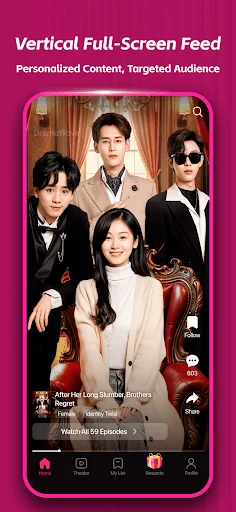
A vertical, full-screen feed puts the story front and center, with personalized recommendations to help you find your next watch.
 DramaWave
Your next short-drama obsession.
A little romance. An unexpected twist. Discover vertical dramas made for the moments in between.
Android APK · Version 2.0.40 · 162 MB



Meet unexpected romances, family secrets and characters with something to hide. Explore the feed and see what catches your eye.
DramaWave’s short episodes bring the story to your screen, whether you have a few minutes or time for one more chapter.
Take a look insideStories that fit your phone.
A viewing experience that fits your day.
A vertical, full-screen feed puts the story front and center, with personalized recommendations to help you find your next watch.
Download episodes in the app for offline viewing, ready for the commute or a moment away from Wi-Fi.
On-screen comments let you react alongside other viewers as the story unfolds.
DramaWave is a mobile entertainment app built around vertical short dramas. Its appeal is easy to understand: you can enter a story quickly, follow a compact chapter on your phone and come back for the next development when you have time. A chance meeting, a family secret or a sudden betrayal can become the starting point for a series that unfolds across many short episodes.
The app brings together a browsing feed, personalized recommendations, episode playback, subtitles and viewer reactions. Offline downloads offer another way to watch when a reliable connection is unavailable. For someone who enjoys continuing stories but rarely has an uninterrupted evening, that combination makes short dramas a flexible viewing format.
Searches for DramaWave also frequently include the term MOD APK. That describes a third-party modified Android package, rather than a separate genre of drama or an iPhone installation format. This guide explains the viewing experience, the features promoted for modified versions, installation basics and the questions to ask before choosing a download. It also separates those promotional descriptions from the information actually supplied for the Android file on this site.
DramaWave presents drama series in a portrait format designed for mobile screens. Instead of treating the phone as a smaller television, its vertical feed makes the handset the main viewing surface. You can hold the device upright, explore a story and move back to discovery when you want something different.
Short-form storytelling does not mean that every story stands alone. A series can develop relationships, reveal motives and resolve conflicts over successive chapters. Each episode gives you a small part of the narrative, while the continuing plot provides a reason to return. That structure suits both brief viewing breaks and longer sessions following the same characters.
The most useful way to approach the library is to start with your interests. You might want a romance with a complicated relationship, a family drama built around a hidden past or a revenge story in which the balance of power gradually changes. Artwork, descriptions and opening episodes help you decide whether a series matches the mood you are looking for.
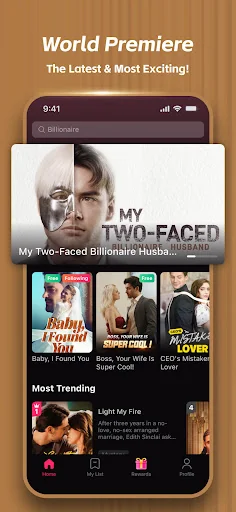
Explore featured stories and browse the drama library.
Romance is one of the themes emphasized in descriptions of DramaWave. These stories can revolve around an unlikely couple, a relationship complicated by status or work, or characters who misunderstand each other before discovering a shared history. Rivalries and secrets can make even a simple introduction develop into a longer series of decisions and consequences.
Family conflict and revenge provide a different kind of momentum. A character may be trying to uncover the truth, respond to a betrayal or change how others see them. The interest comes from watching relationships shift as new information appears. A short chapter can focus on a confrontation or reveal without needing to resolve the entire conflict at once.
Third-party descriptions also discuss fantasy, mystery, rebirth and time-travel themes. Treat those as examples of the kinds of stories discussed around the app, rather than a promise that every genre or title is available in every account or location. The library you can actually browse is the best guide to what you can watch.
The vertical feed is central to DramaWave’s presentation. The picture is framed for an upright screen, making the format convenient when you are already holding your phone in portrait orientation. The current episode becomes the main visual focus, while the surrounding controls provide access to the rest of the viewing experience.
This arrangement also changes how you discover a series. You do not necessarily need to begin with a long search or an extensive description. A brief opening scene can introduce the characters and tone. If it interests you, continue into the story; if it does not, return to browsing and try another option.
For a better first session, spend a little time exploring rather than choosing only from the first item you see. Look at the available titles, open the playback controls and check how the app presents episode access. Understanding that flow makes it easier to return to the stories you want to keep following.
Recommendations help narrow down a library that may otherwise feel difficult to browse. DramaWave describes a personalized feed intended to surface content that fits your interests. A viewer looking for romance may want a different set of suggestions from someone interested in a mystery or a family confrontation.
The practical benefit is a shorter route from opening the app to finding a story. Recommendations can give you a starting point, while browsing remains useful when you want to move outside your usual preferences. Neither approach needs to replace the other: suggestions help with familiarity, and exploration helps you find something unexpected.
A recommendation is still only a suggestion. Artwork and a dramatic opening may attract attention, but the pacing, dialogue and characters determine whether you will enjoy the series. Try a chapter, decide whether you want to continue and use the library to explore alternatives when your interests change.
Clear playback matters because a short episode has little time to establish its atmosphere. Expressions, dialogue and small details can carry an important part of the story. DramaWave’s app description discusses HD playback, while third-party MOD pages sometimes go further and advertise additional resolution options.
Do not assume that a promotional reference to 4K means every drama will play in that format. The options presented by the player, the source video, your device and your connection all matter to the experience you receive. Use the quality settings actually available for the episode rather than relying on a label attached to a download page.
Playback controls are also worth exploring. Pausing a scene gives you time to read a subtitle or take a break. Returning to an earlier moment can help when you missed a line or want to understand a character’s reaction. The controls and access conditions shown in your installed app determine which actions are available.
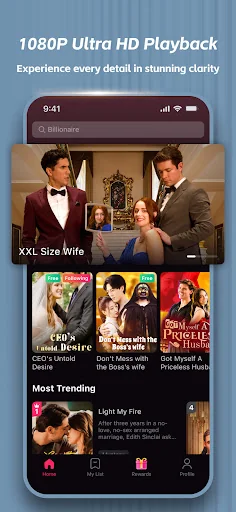
Check the browsing and playback options available in your installed app.
Subtitles can make a drama easier to follow when the spoken language is unfamiliar, when dialogue moves quickly or when you are watching with the sound turned down. DramaWave’s descriptions include multilingual subtitle support, making language options an important part of the viewing experience.
Check the available choices for the specific title you select. A language listed in a general description is not a guarantee that every episode has the same translation or dubbing options. Subtitles and audio tracks are separate settings, so choosing a subtitle language does not necessarily change the spoken dialogue.
If a translation is difficult to follow, pause the episode and check the selected language before continuing. A short scene can contain a major revelation, and taking a moment to review a line may be more useful than rushing to the next chapter. The goal is to follow the story comfortably, not simply to move through the episode list.
On-screen comments add a social layer to a drama. Instead of waiting until an episode ends to see a discussion, you can encounter reactions during playback. A surprise reveal, a questionable decision or an emotional exchange can become a shared moment with other viewers.
That conversation can make watching feel more communal, particularly when you are following a series on your own. Other viewers may notice details you missed or react to a character in a different way. At the same time, the dialogue and the plot should remain easy to follow. Explore the comment controls available in the player to find a balance that suits you.
Comments are viewer contributions, rather than part of the script. They can include opinions or references to later developments. If you prefer to experience a story without outside reactions, check whether your playback settings let you adjust their visibility.
Offline viewing is useful for journeys, commutes and breaks in places where the connection is unreliable. DramaWave supports downloading episodes in the app so that you can prepare something to watch while connected and return to it later.
There are two different downloads to keep in mind. Downloading an APK gives you the Android installation package. Downloading an episode inside the app saves viewing content according to the app’s own options. Installing the app does not automatically save the entire drama library to your phone.
Before relying on offline playback, choose the episodes you want, let the downloads finish and check them in the app. Review the available storage on your device, especially if you plan to save several episodes. The file used to install the app and the videos stored afterward occupy space separately.
Descriptions of MOD packages sometimes promise unrestricted offline access or very large download allowances. Those claims should not be treated as a universal specification. The download controls, title access and conditions visible in your installed app are what determine whether a particular episode can be saved and played.
An APK is an Android application package. A MOD APK is a package that has been modified by a third party. In the context of DramaWave, such packages are commonly advertised as changing how advertisements, episode unlocks, coins or premium access work.
The important distinction is between a description of a modification and evidence about a particular file. Two downloads can use similar names while containing different changes. A package’s version number, icon or promotional screenshot does not by itself show which advertised modifications are present or working.
Modified software should also not be confused with an official subscription. A webpage saying that a package is “premium unlocked” does not establish that the developer has granted a subscription to your account. Any claim about access needs to be understood in relation to the installed app and the actual episode you are trying to watch.
The following terms appear frequently in third-party DramaWave MOD descriptions. They explain what those pages are promoting; they are not a verified feature list for the APK provided on this site.
“Premium unlocked” usually describes an advertised change to restrictions on episodes or content labeled as premium. Related claims about “all dramas unlocked” suggest that a viewer can move through a series without the usual access prompts. The intended benefit is uninterrupted progress through a continuing story.
Those phrases are broad. They do not tell you whether the claimed access applies to every title, whether it continues after an update or whether an account has an official entitlement. Keep the wording of the advertisement separate from the access actually shown in the app.
Coin-related promotions describe a higher or unrestricted balance for unlocking content. Some pages also advertise larger login rewards, multipliers or changes to the way a balance is displayed. The appeal is avoiding a pause between episodes while waiting for an unlock opportunity.
A displayed number is not the same as confirmed access to content. This site does not document a tested coin balance or reward multiplier for the provided file, so it does not promise a particular amount. Check how your installed app handles episode access rather than assuming that every package labeled MOD behaves identically.
“No ads” is an advertisement for fewer interruptions during a viewing session. It is particularly attractive for short dramas because a break between chapters can feel substantial compared with the length of the content itself.
The general DramaWave app description identifies ads and in-app purchases. Whether a separate package changes that experience has not been established for the file supplied here. A promotional label should not be read as a guarantee about all advertising placements, all accounts or future app behavior.
MOD descriptions may combine claims about unrestricted rewinding, skipping, higher picture quality and expanded offline downloads. These are different functions: controlling the timeline is not the same as unlocking a title, and selecting a resolution is not the same as downloading it for later.
Evaluate each option separately in the player or download screen. This makes it easier to understand what is actually working and avoids treating a long promotional feature list as a single confirmed capability.
Some third-party descriptions also discuss a modification menu, reward controls, profile badges or leaderboards. Such items concern changes to the interface or account experience rather than the drama content itself.
This site has not documented those extras as features of its provided package. Names such as “VIP badge” or “MOD menu” do not establish official status, an account benefit or a working control. They are useful terms to recognize when reading descriptions, but they should not replace checking the software you actually have.
The distinction between access models matters when choosing how to watch. An advertisement, an in-app purchase and a recurring subscription are different things. A download can be available without a purchase while particular viewing options still have their own conditions.
Read the terms shown before confirming a purchase. Look for what is included, the billing period and whether renewal is automatic. DramaWave’s app description states that subscriptions renew automatically and can be managed or canceled through account settings.
If you need to manage a purchase, identify the account and payment route used for it. Check the corresponding app, store or payment-service controls rather than assuming that installing a different APK changes the original billing arrangement. The app’s own purchase information is the appropriate place to confirm the terms that apply to your account.
The Android file supplied on this site is identified as DramaWave 2.0.40, with a measured package size of approximately 162 MB. These details describe the local download available through this site’s Android button.
They should not be replaced by a third-party page’s different file size, a “latest” label or an automatically changing date. A similar app name is not enough to show that two packages are the same. Version-specific release notes and a release date have not been supplied for this file, and this site does not invent them.
The DramaWave changelog records the version available here. If you are checking compatibility or looking for a specific change, distinguish the information supplied for this package from general descriptions of the app or another modified release.
Use the Android download button on this page to obtain the provided installation file. The APK installs the application; it does not download episodes at the same time.
This site has not specified a verified minimum Android release for the provided package. If your device reports a compatibility problem, use the information shown by the installer rather than assuming a requirement from a different download page applies to this file.
iPhone uses a different installation route from Android. Choose the dedicated iPhone download option on this site to open the app’s App Store listing. An Android APK cannot be installed as an iPhone application simply by opening or renaming the file.
Keep that distinction in mind when a third-party page uses Android and iOS terminology interchangeably. The Android package described here and the iPhone app are separate download choices. Availability, purchase options and the version displayed for iPhone should be read in the listing and app you actually use.
First check whether the download finished and whether you opened the APK on an Android device. Confirm that the device has enough free storage and review any installation-permission prompt. If Android displays a specific error, keep its wording: a permission problem, an unreadable package and a compatibility message are not interchangeable diagnoses.
If an existing installation is involved, do not assume that removing it is harmless. Check your account access and any locally stored content before taking steps that could discard data. A new download does not guarantee that a package will be compatible with every device or an existing installation.
Start by checking your connection and whether the issue affects one episode or several. Try opening the episode again after confirming that other network activity is working. If the player offers quality options, review them in relation to your connection.
A buffering problem does not by itself show that the APK is damaged or that a premium feature is missing. Connection conditions, a particular video and the player can produce different symptoms. Identify the pattern before changing account settings or replacing an installation.
Check the phone’s media volume, any player mute control and whether sound is being sent to connected headphones or another audio device. If the problem is understanding the dialogue rather than hearing it, check the selected subtitle language.
Avoid jumping directly to clearing application data. That action can affect locally stored settings or content and is different from adjusting a playback control. Begin with the settings relevant to the problem you can actually observe.
Confirm that the episode download completed inside the app. Having the APK in your download folder does not mean a video has been saved. Check the app’s offline or download area and any access information presented for the title.
When preparing for travel, test your chosen episodes before leaving a working connection. This gives you a chance to notice an incomplete download while you can still address it.
Do not assume that installing another file with the same name will resolve it. A third-party advertisement does not establish which modifications are present in a particular package. The version and size recorded here identify the supplied download, but they do not verify an unlimited balance, a modification menu or premium access.
Use the app’s actual screens to distinguish a missing control from a content-access condition. This site does not provide a tested MOD feature matrix for its APK, so unsupported functionality should not be treated as a guaranteed part of the download.
Comparisons are most useful when they match the way you watch. Start with the stories: are there series you want to follow, and do the pacing and dialogue appeal to you? A large advertised catalog is less useful than a smaller set of stories you actually enjoy.
Then look at access conditions, subtitle options, playback comfort and offline preparation. Someone watching during a commute may care most about saved episodes, while another viewer may value a recommendation feed or reactions from the audience. Check these practical details in the app rather than relying entirely on promotional tables.
Exact rankings, competitor library counts and cost comparisons have not been established here. The aim is to help you decide which features matter for your own viewing, not to present unsupported claims that one application is always better than another.
No. Short chapters make brief sessions convenient, but you can also follow several chapters when you have more time. The distinction is the structure of the episodes, not a requirement to stop after one.
Installing an application and obtaining access to its content are separate actions. The provided package has not been documented here as unlocking every episode, so review the access options shown in the app.
Offline viewing concerns episodes downloaded through the app. It does not mean every browsing, account or viewing function works without a connection. Prepare and check the episodes you want before relying on offline playback.
Not necessarily. Review the languages offered for your chosen title. General multilingual support does not establish identical subtitle or audio choices across the whole library.
No. The term describes a third-party modified package, not proof of an official account subscription. Promotional claims about premium access and the billing status of an account are different matters.
No. A file-size label or a webpage’s safety statement is not a documented security assessment of a specific file. This site does not claim an independent malware-scan result for the provided APK.
They use different installation routes. Read the options and access terms presented on the platform you use rather than assuming an Android description applies unchanged to the iPhone app.
See the DramaWave FAQs for installation and viewing questions, and the changelog for the supplied Android version. For an account or purchase issue, use the support options associated with your installed app and payment route.
DramaWave’s main attraction is its combination of short chapters, portrait viewing and continuing stories. Recommendations help you browse, subtitles help you follow the dialogue, comments add audience reactions and offline downloads can make a journey easier to plan.
Choose the installation route for your device, explore the options actually available in the app and keep promotional MOD descriptions separate from verified package information. Once you understand those differences, you can spend less time interpreting download-page claims and more time finding a series you want to follow.
A few things to know about getting started. Read all FAQs
DramaWave is a mobile streaming app for vertical short dramas, series and movies. It includes a personalized feed, offline viewing and on-screen comments.
Download the APK using the Android button, open the downloaded file and follow your device’s installation prompts. Your device may ask you to allow installation from your browser or file manager. You can also install through Google Play.
Yes. Use the “Get it for iPhone” button to open DramaWave’s App Store listing.
DramaWave supports downloading episodes in the app for offline viewing. Download them while connected before watching offline.
The Google Play listing identifies ads and in-app purchases. Subscriptions unlock exclusive content and renew automatically; check the app and your store for current purchase terms.